
What Berries Streaks Does
The widget is part of Hypeberries and is designed around a simple question: what is due today, and how am I doing?
Berries Streaks is local-first. Habit configuration and completion history stay on the Mac. There are no accounts, cloud sync, analytics, telemetry, or network requests.
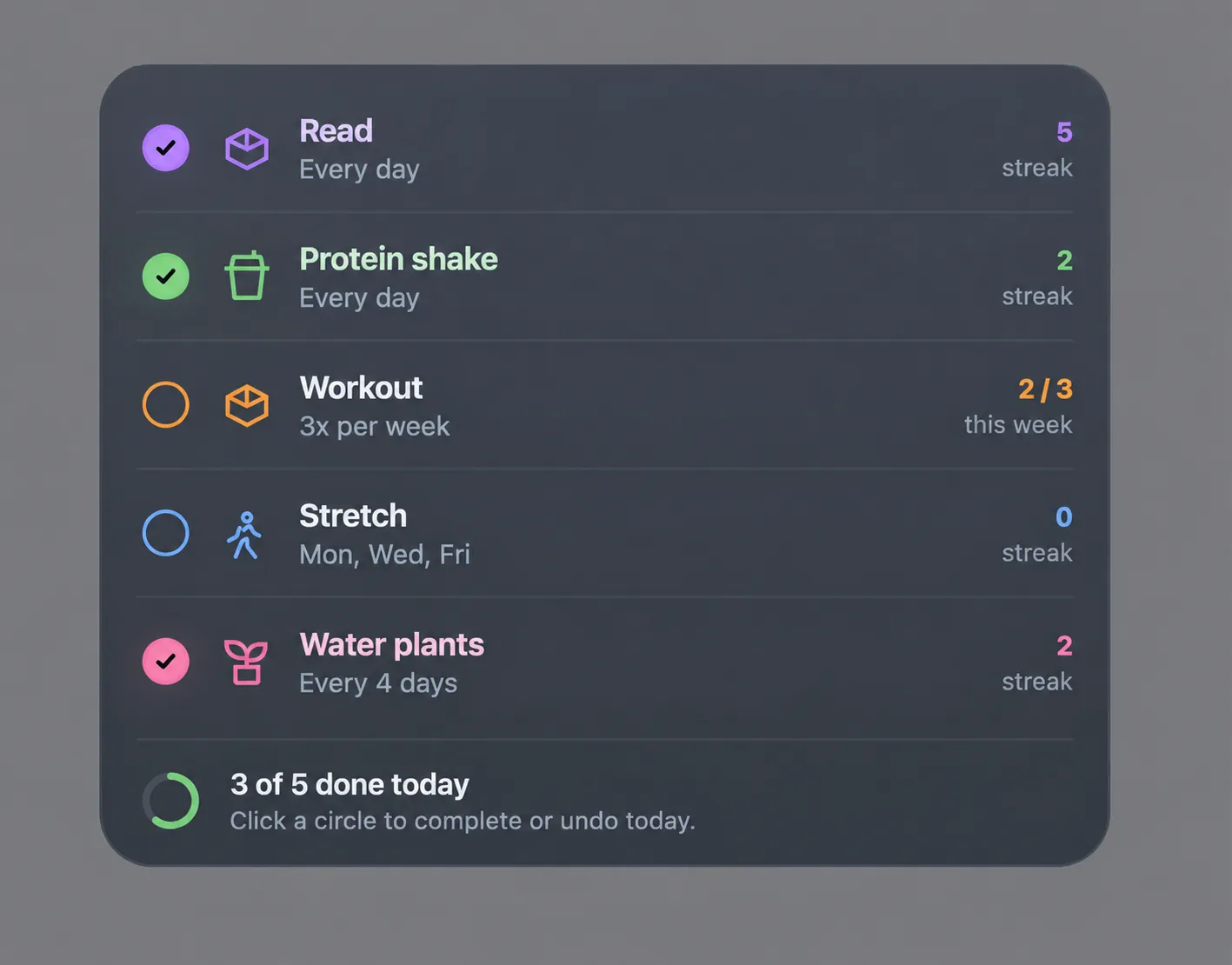
Berries Streaks turns a small JSON configuration into a desktop habit dashboard. Each visible row includes a completion circle, icon, habit name, frequency, and a relevant metric such as a streak, weekly progress, or an upcoming due reminder.
- Daily habits such as reading, taking vitamins, or weighing in
- Selected weekday routines such as stretching on Monday, Wednesday, and Friday
- Weekly targets such as working out three times per week
- Recurring intervals for chores such as watering plants, cleaning a coffee machine, or monthly check-ins
- Daily, weekday, interval, and successful-week streaks
- One-click completion and same-day undo
- Font Awesome Free icons, including Solid, Regular, and Brands styles
- Explicit colors or deterministic automatic accent colors
- Week-based interval configuration such as everyWeeks: 2
- A subtle Due tomorrow preview for recurring chores
Streaks and Weekly Goals
Daily habits build a streak from consecutive completed calendar days. Weekday habits count consecutive required occurrences, so unscheduled days never break a streak.
For flexible weekly goals, Berries Streaks tracks both current progress and successful-week streaks. A habit configured as 3x per week shows progress such as 2 / 3. Once the target is reached, the widget can show a week streak based on consecutive successful weeks.
An incomplete current week does not prematurely break an existing weekly streak. The streak extends immediately when the target is met and resets only after a completed week falls short.
Recurring Chores Without Moving Deadlines
Interval habits use stable anchored recurrence. A task configured for every two weeks stays on that cadence even if it is completed late or missed entirely.
You can use either day-based or week-based intervals:
{ "type": "interval", "everyDays": 4 }

{ "type": "interval", "everyWeeks": 2 }
Both forms use the same reliable scheduling logic. Add an optional startDate when a task needs a specific first occurrence. If no start date is supplied, Berries Streaks stores the first loaded local date as a stable anchor.
Recurring habits remain hidden until they are relevant. On the day before a task is due, the widget shows a disabled Due tomorrow preview so the next chore is visible without being accidentally completed early.
Installation
Berries Streaks requires macOS, Übersicht, and Node.js 20 or later.
Install and open Übersicht at least once.
Open Terminal.
Go to the Berries Streaks project folder.
cd /Users/fernandasampaio/Work/widgets/berries-streaks-widgetInstall the development widget.
npm run installRefresh Übersicht. The installer creates a development symlink at ~/Library/Application Support/Übersicht/widgets/berries-streaks.widget and does not replace other Übersicht widgets.
Configure Your Habits
Edit berries-streaks.widget/config.json. A simple daily habit looks like this:
{
  "id": "read",
  "name": "Read",
  "icon": "book-open",
  "color": "#b07aff",
  "schedule": {
    "type": "daily"
  }
}
The id is a stable identity for stored completion history. Keep it the same when renaming a habit. Colors are optional: if omitted, Berries Streaks assigns a consistent accent color from its built-in palette.
Choose Icons with Font Awesome
Set each habit's icon to a Font Awesome Free icon name, such as book-open, dumbbell, mug-hot, or seedling. Berries Streaks supports the Free Solid, Regular, and Brands styles.
Icons are provided by Font Awesome Free. Choose only icons marked Free, and refer to Font Awesome's license for the applicable terms.
Browse Font Awesome Free iconsFont Awesome licensePrivate by Design
Completion history is stored locally at ~/Library/Application Support/Hypeberries/Berries Streaks/state.json.
The state file stores simple local calendar dates and stable interval anchors. It uses atomic writes to reduce the risk of partial files, removes duplicate same-day completions automatically, and keeps history for removed habits without rendering those habits.
Berries Streaks is built to be calm, useful, and easy to glance at: a habit tracker that lives where the day already happens, on the Mac desktop.